By the end of this page HouseBreaker will be installed on your Windows PC, and you will know where it keeps your data.
This page is for people who were sent the desktop app. If you have the extension only, you can stop at page 4.
How the file arrives
The desktop app is not offered for download on the website. It is sent to you directly, by the person who gave you access, as one file:
HouseBreaker-Setup-<version>.exe
It is about 135 MB. Save it somewhere you will find it, such as Downloads. Unlike the extension's folder, this file is not needed after installing and can be deleted afterwards.
Only run a copy that came from the person you expect. Do not run one that reached you some other way, even if it has the same name.
Check who signed it
The installer is code-signed. Windows can show you who signed it before you run anything.
- Right-click the file and choose Properties.
- Open the Digital Signatures tab. If there is no such tab, the file is not signed: do not run it, and ask for it again.
- Select the signature and press Details. It should say "This digital signature is OK", and name the signer.
The signer is a person, not a company: the installer is signed with an individual certificate, so Windows shows that person's legal name. Ask the person who sent you the file what name to expect, and check that it matches.
The SmartScreen prompt
When you run the file, Windows may show a blue window headed Windows protected your PC. This is SmartScreen. It appears for programs that few people have run yet, signed or not, and a newly signed program still gets it for a while.
- Press More info.
- Read the Publisher line. It should show the same name as the signature.
- If it does, press Run anyway.
If the Publisher line says Unknown publisher, the file is not the signed installer. Close the window and do not run it.
No administrator password is asked for. HouseBreaker installs for your Windows account only.
The folder page
The installer first asks where to put the program.
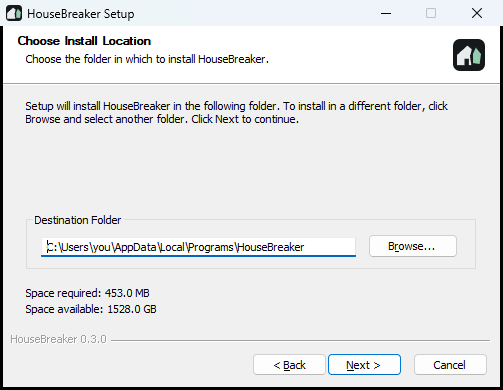
The folder offered is inside your own user folder and is the right choice for almost everyone. Press Next.
This is the folder for the program only. Your data does not go here.
The Options page
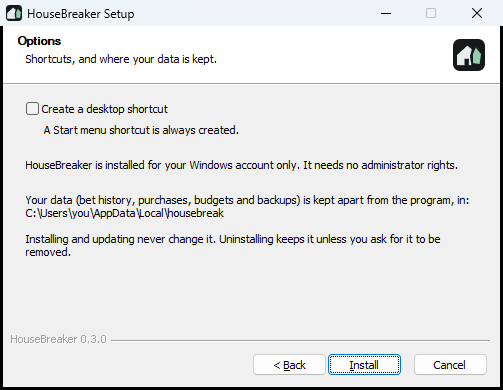
- Create a desktop shortcut. Ticked the first time. A Start menu entry is made either way.
- The page also tells you where your data will be kept.
Press Install. When it finishes, leave Run HouseBreaker ticked and press Finish.
Where the data is kept
Everything HouseBreaker stores is in one folder, apart from the program:
C:\Users\<you>\AppData\Local\housebreak
Inside it, each profile has its own folder with its database and its backups.
- It is on this computer and nowhere else. Nothing is uploaded.
- Installing a newer version over this one does not touch it.
- Uninstalling leaves it in place unless you tick a box saying otherwise. See Backups, updates and uninstalling.
You can open the folder at any time from the app: Settings, then Open the data folder.