By the end of this page you will know how your data is backed up, how a newer version reaches you, and what uninstalling does and does not remove.
Backups
The Backups card is on the Settings screen. A backup is a full copy of a profile's database.
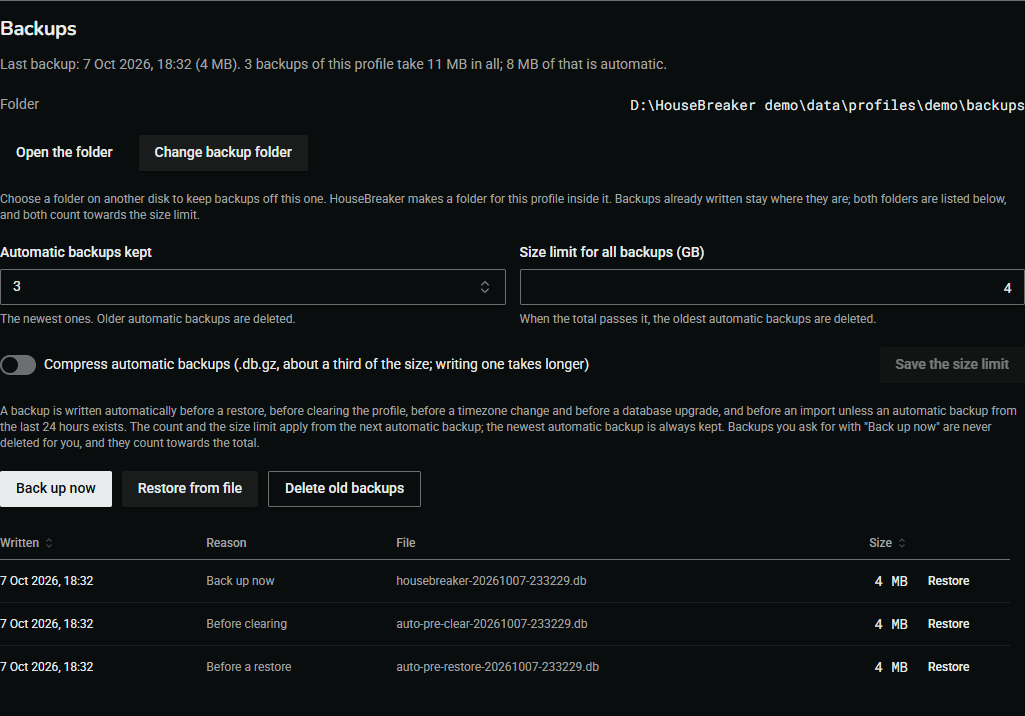
Automatic backups. HouseBreaker writes one before anything that changes a lot at once: a restore, clearing a profile, a timezone change, an upgrade of the database, and an import unless an automatic backup from the last 24 hours already exists.
- The newest 3 automatic backups are kept. The card lets you choose 1 to 10.
- All backups of a profile together stay under 4 GB. The card lets you choose 1 to 50 GB. When the total passes the limit, the oldest automatic backups are deleted.
- The newest automatic backup is always kept, even if it alone is over the limit.
Back up now writes a copy you asked for. Those are never deleted for you, and they count towards the total.
Restore replaces the profile's current data with a backup. The current data is backed up first, so a restore can be undone by restoring that backup.
Delete old backups removes every automatic backup except the newest.
Change backup folder sends new backups to a folder you choose, for example on another disk. Backups already written are not moved; both folders are listed and both can be restored from.
Compress automatic backups makes them smaller and a little slower to write. It is off to begin with.
A backup on the same disk protects against a mistake, not against losing the disk. For that, move the backup folder to another disk, or copy an Export everything file somewhere else now and then.
Updates
The Updates card is on the Settings screen. It shows the installed version, when the app last checked, a Check for updates button, and a switch for the automatic check.
What the check is. Once when HouseBreaker starts and once a day after that, the app reads one small public file that holds the newest version number. It sends nothing about you, your bets or your purchases. The switch turns the automatic check off; the button still works.
When a newer version exists, a bar appears at the top of the window.
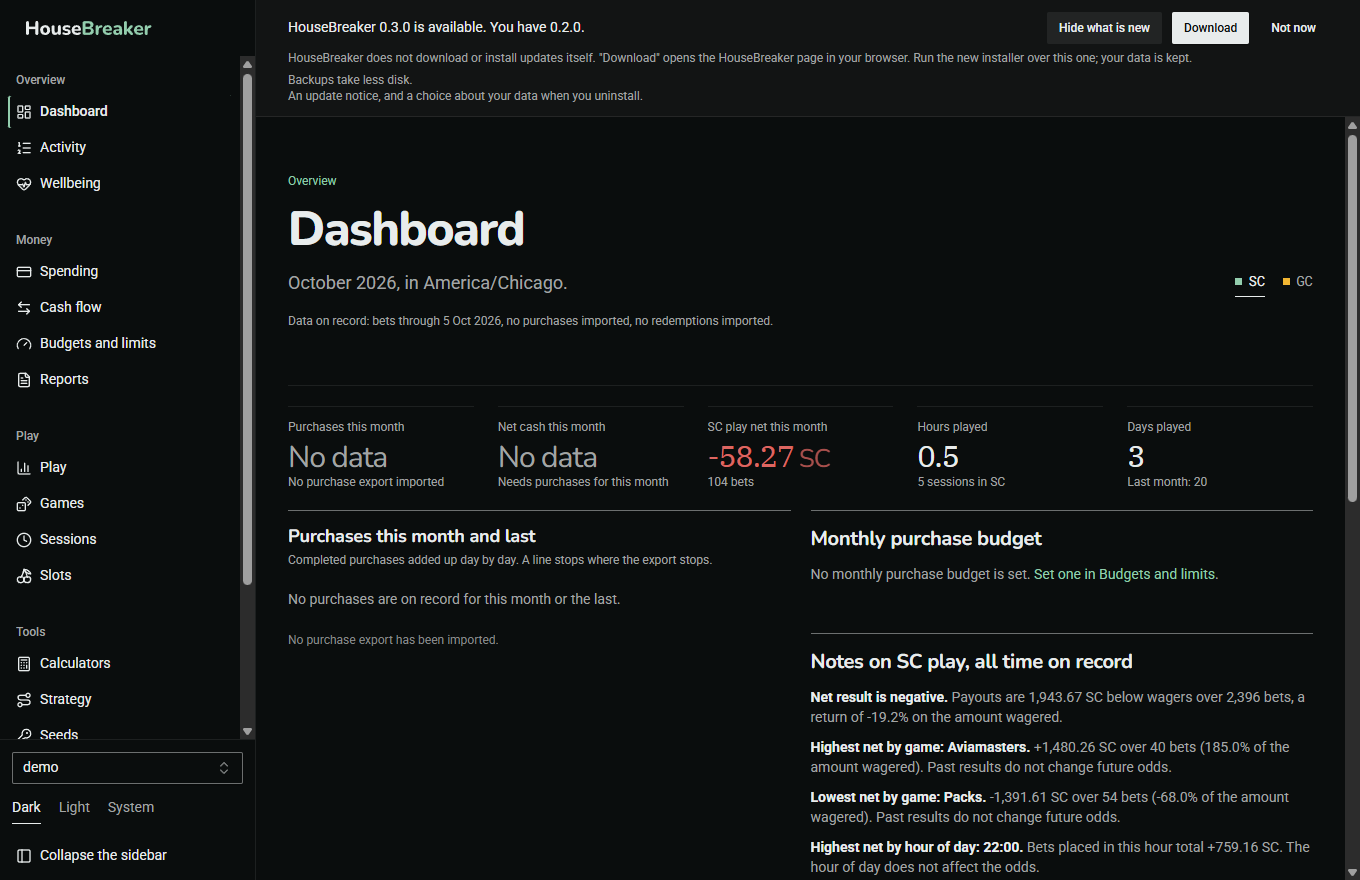
- What is new shows the release notes.
- Download opens the HouseBreaker page in your browser. The app does not download or install anything itself.
- Not now closes the bar until the app is next started.
Getting the new version. The desktop app is sent to you directly, so a newer installer reaches you the same way the first one did. When you have it:
- Check who signed it, as on the install page.
- Close HouseBreaker.
- Run the new installer. It offers the folder the app is already in; keep it.
Your data is untouched by an update. If the new version needs a newer database, the old one is backed up first.
A check that fails, for example with no internet connection, shows nothing and changes nothing.
A copy made without an update address never checks, and the card says so.
Uninstalling
Uninstall from Windows: Settings, Apps, Installed apps, HouseBreaker, Uninstall.
The uninstaller shows one page about your data.
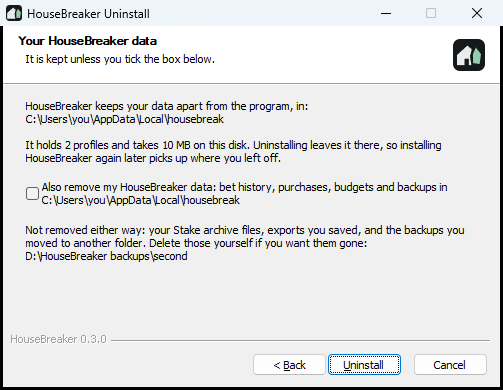
- It names the data folder, how many profiles it holds and how much room it takes.
- It has one box, unticked to begin with: "Also remove my HouseBreaker data: bet history, purchases, budgets and backups".
Leave the box unticked and your data stays. Installing HouseBreaker again later picks up where you left off.
Tick the box and the uninstaller asks once more before deleting anything.
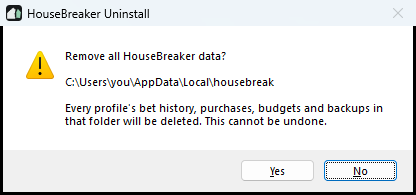
Answer Yes and the data folder is deleted, with every profile and every backup in it. This cannot be undone.
Never removed, whichever you choose:
- Your Stake archive files and your purchase and redemption exports.
- Files you exported.
- Backups in a folder you moved them to. The page lists that folder so that you know it is there.
Uninstalling the desktop app does not remove the browser extension, and removing the extension does not remove the app. Each has its own steps; the extension's are on its own page.